
Windows Communication Foundation (WCF) is still a commonly used .NET framework for client-server communication. Specifically, when Net.TCP is used for transport, the binary encoding of messages makes the network communication challenging to analyze. This in turn poses an obstacle for the security analysis of WCF-based software products. For this reason we developed “wcfproxy”, a tool to facilitate the analysis of Net.TCP-based WCF communication.
WCF basics
Windows Communication Foundation is a framework for building service-oriented applications. It allows developers to define and implement service interfaces independently of the protocol that will be used for communication with the service. Later, binding configurations define the details of the network communication, such as the protocol used for transporting messages (e.g. HTTP) or the authentication mechanism (e.g. Windows authentication).
WCF offers message transport via HTTP, Named Pipes, Microsoft Message Queueing (MSMQ) or Net.TCP.
In our experience, HTTP and Net.TCP are the most commonly used transport options.
HTTP-based WCF communication can be analyzed with standard web penetration testing tools, although some binding configurations also make this challenging by providing security features at the message level.
Net.TCP-based WCF communication, on the other hand, uses a binary message format that complicates analysis without specialized tools significantly.
A closer look at WCF messages
To get a better understanding of the challenges presented by Net.TCP-based WCF messages, we take a look at the wire format.
We will view a network traffic capture of the remote call of the method Health (signature: string Health()).
As can be seen in the network capture shown in Figure 1, the call of the Health method over HTTP results in the exchange of two SOAP messages.
The message sent by the client indicates the method name Health (marked in green).
The message returned by the server indicates that it is the response to the call of the Health method via the action header HealthResponse (also marked in green).
It also includes the return value of ok (marked in purple).
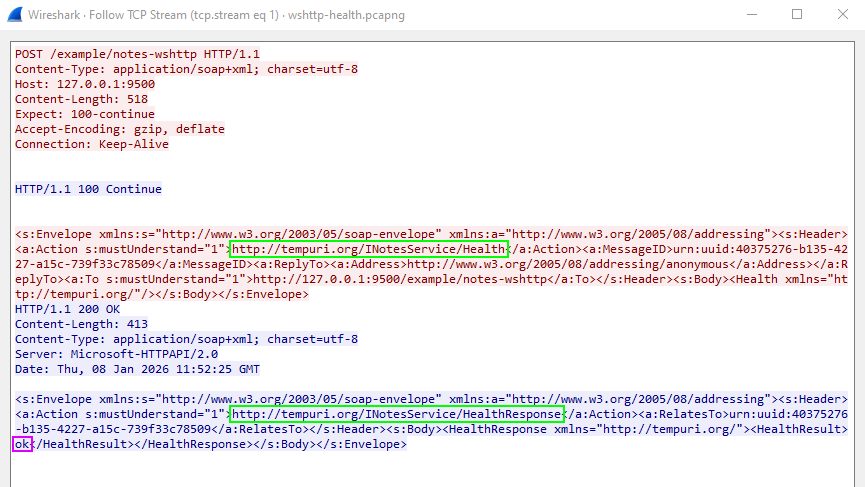 Figure 1: HTTP-based WCF message and corresponding response
In comparison, Figure 2 shows the call of the same method via a Net.TCP-based binding.
The resulting messages are no longer text-based, but are represented in a binary format.
From this binary representation, the exact contents of the message are not immediately evident.
Still, the name of the method and corresponding response (marked in green) and the return value (marked in purple) can be identified.
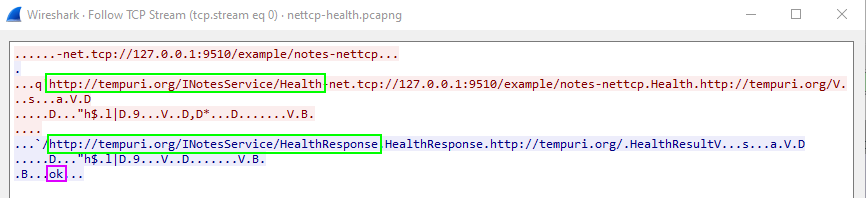 Figure 2: Net.TCP-based WCF message and corresponding response
Although the Net.TCP-based messages look very different from the SOAP messages exchanged via HTTP, they are just a binary encoding (see Microsoft specifcation MC-NBFX) of the same SOAP messages. Next, we will see how wcfproxy converts between the binary and the textual representations.
Related tools
The tool net.tcp-proxy also allows interaction with Net.TCP-based services. However, it has to be operated at a lower level, as users are required to build the desired WCF messages from Python. wcfproxy, on the other hand, allows easy inspection and manipulation by translating all WCF communication to SOAP messages over HTTP. For the related use case of HTTP-based WCF services, that make use of a slightly simpler binary XML representation (MC-NBFS as opposed to ), the Burp extension WCFDSer-ngng also converts between the textual and binary XML representations.
Getting started with wcfproxy
wcfproxy is available at SySS Research.
The tool is written in Go and building it is as simple as executing the following in the cli directory:
1
#> go build -o wcfproxy.exe ./
wcfproxy uses a central JSON file in which any number of named configurations are stored. Therefore, there are only two command line options:
1
2
3
4
5
6
#> .\wcfproxy.exe -h
Usage of wcfproxy.exe:
  -config string
        Path to the configuration file (default "config.json")
  -enable string
        Name of the enabled configuration
A configuration file with a single configuration named example could look like this:
1
2
3
4
5
6
7
8
9
10
{
  "example": {
    "listen": "127.0.0.1:9010",
    "connect": "127.0.0.1:9510",
    "retarget": "net.tcp://127.0.0.1:9510/example/notes-nettcp",
    "interceptor": {
      "name": "log"
    }
  }
}
The options listen and connect specify where wcfproxy should listen for incoming connections and where the traffic should be forwarded to respectively.
Redirecting WCF clients to the proxy will often entail modifying the endpoint URI in some configuration file.
This endpoint URI is also contained in messages sent by the client.
By default, WCF services reject messages if their target endpoint URI does not match their endpoint specification.
Therefore, it will often be required to correct the modified endpoint specification back to the original (in the example above, port 9510 was replaced with 9010 in order to make the client connect to wcfproxy).
To achieve this, place the original endpoint URI in the retarget option.
Finally, an interceptor must be specified.
All messages forwarded via wcfproxy will be passing through this interceptor.
For this example, we will use the log interceptor that simply dumps textual representation of messages to the configured log location (standard output by default).
With this basic configuration in place, we are ready to start wcfproxy:
1
2
3
4
5
6
#> .\wcfproxy.exe -enable example
INFO:  Listening on 127.0.0.1:9010 and connecting to 127.0.0.1:9510
INFO:  No server certificates given; TLS upgrade not supported
INFO:  No client certificates given; TLS client authentication not supported
INFO:  No NTLM credentials given; Negotiate/NTLM authentication not supported
INFO:  Retargeting to net.tcp://127.0.0.1:9510/example/notes-nettcp
The same remote call of the Health method of the Net.TCP-based WCF service now results in the messages being dumped in a textual representation close to the SOAP messages observed with the HTTP transport:
1
2
3
4
5
6
7
8
9
10
11
12
13
14
15
16
17
18
19
20
21
22
23
24
25
26
27
28
29
INFO:  [proxy] Handling new connection 0: 127.0.0.1:50745 <-> 127.0.0.1:9510
INFO:  [proxy] Connection 0 established (127.0.0.1:50745 <-> 127.0.0.1:9510)
INFO:  [proxy] Envelope (Connection 0, Client -> Server):
<s:Envelope xmlns:s="http://www.w3.org/2003/05/soap-envelope" xmlns:a="http://www.w3.org/2005/08/addressing">
 <s:Header>
  <a:Action s:mustUnderstand="c:1">ch:http://tempuri.org/INotesService/Health</a:Action>
  <a:MessageID>uid:urn:uuid:b0cf7e75-c682-2c43-ba25-4ae865b17c40</a:MessageID>
  <a:ReplyTo>
   <a:Address>ch:http://www.w3.org/2005/08/addressing/anonymous</a:Address>
  </a:ReplyTo>
  <a:To s:mustUnderstand="c:1">ch:net.tcp://127.0.0.1:9510/example/notes-nettcp</a:To>
 </s:Header>
 <s:Body>
  <Health xmlns="http://tempuri.org/"></Health>
 </s:Body>
</s:Envelope>
INFO:  [proxy] Envelope (Connection 0, Server -> Client):
<s:Envelope xmlns:s="http://www.w3.org/2003/05/soap-envelope" xmlns:a="http://www.w3.org/2005/08/addressing">
 <s:Header>
  <a:Action s:mustUnderstand="c:1">ch:http://tempuri.org/INotesService/HealthResponse</a:Action>
  <a:RelatesTo>uid:urn:uuid:b0cf7e75-c682-2c43-ba25-4ae865b17c40</a:RelatesTo>
  <a:To s:mustUnderstand="c:1">ch:http://www.w3.org/2005/08/addressing/anonymous</a:To>
 </s:Header>
 <s:Body>
  <HealthResponse xmlns="http://tempuri.org/">
   <HealthResult>ch:ok</HealthResult>
  </HealthResponse>
 </s:Body>
</s:Envelope>
Manipulating messages
During penetration tests, we usually want to manipulate messages exchanged between client and server.
This can be achieved with the http interceptor.
The http interceptor converts Net.TCP-based messages into HTTP messages which contain the textual representation of the original SOAP message in the request body.
These HTTP messages are then sent to an arbitrary HTTP server which can optionally make modifcations to the SOAP messages.
The SOAP message in the body of the HTTP server response is then converted back into the binary format and forwarded to the target server via Net.TCP.
Additionally, the http intercpeptor supports the use of an HTTP proxy.
Figure 3 shows how the http interceptor works conceptually.
 Figure 3: Schematic representation of the operation of the
 http interceptor
A simple but effective setup thus conists of an HTTP server that simply echos back any received request body in combination with an HTTP proxy such as Burp Suite.
The following configuration uses the http interceptor and configures a proxy URL pointing to a local Burp Suite listener.
Furthermore, the built-in echo HTTP server is enabled and listens locally on port 9999.
1
2
3
4
5
6
7
8
9
10
11
12
13
14
15
16
17
{
  "example": {
    "listen": "127.0.0.1:9010",
    "connect": "127.0.0.1:9510",
    "retarget": "net.tcp://127.0.0.1:9510/example/notes-nettcp",
    "interceptor": {
      "name": "http",
      "args": {
        "proxy-url": "http://127.0.0.1:8080"
      }
    },
    "ctrl": {
      "listen": "127.0.0.1:9999",
      "enable-echo": true
    }
  }
}
Figures 4 and 5 show the messages converted to their textual representation forwarded through Burp Suite. The interception feature of Burp Suite can then be used to edit the messages.
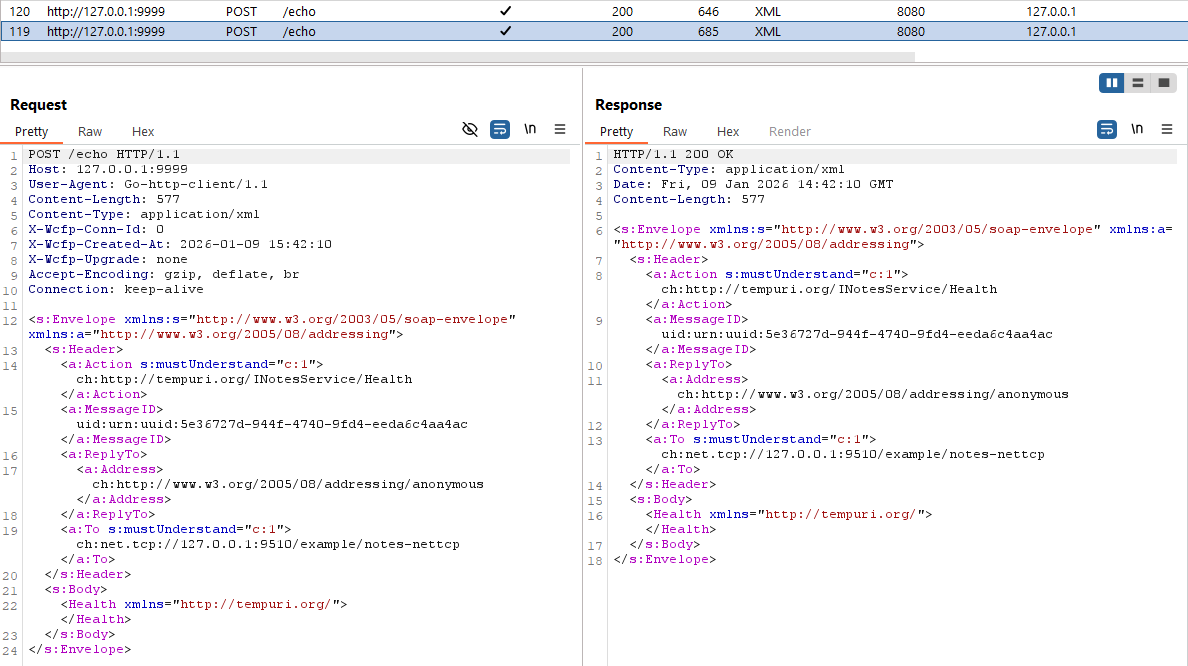 Figure 4: Message sent from the client to the server and forwarded through Burp Suite via the
 http interceptor
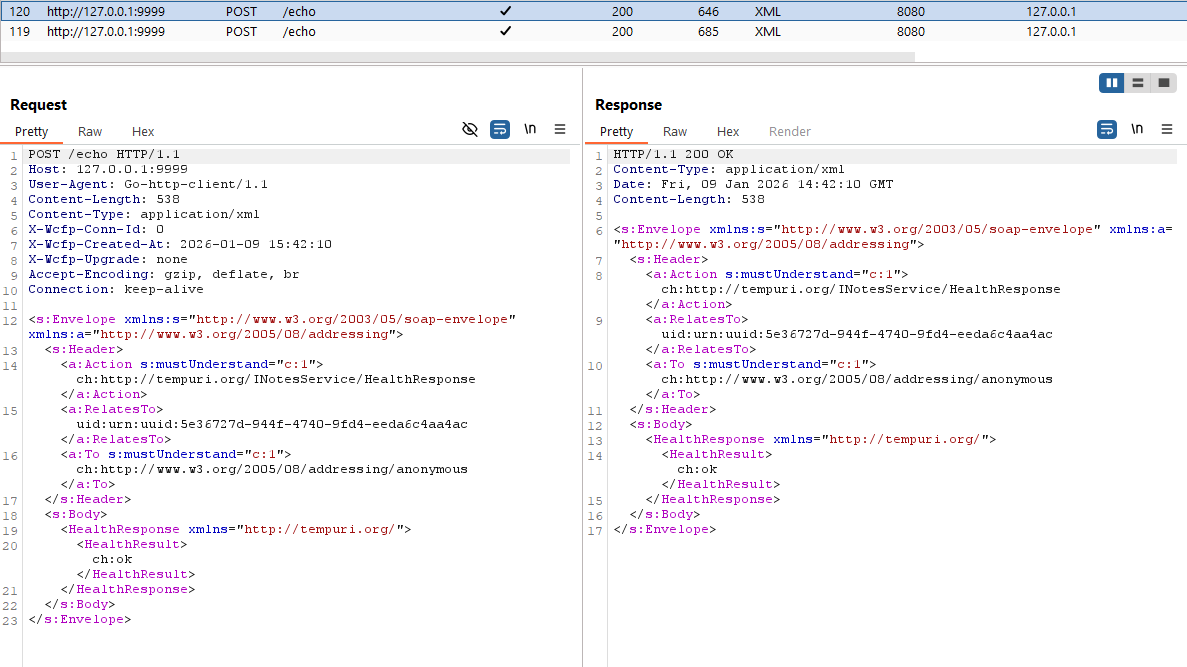 Figure 5: Reply sent from the server to the client and forwarded through Burp Suite via the
 http interceptor
Note that programmatic manipulation of messages can easily be achieved by replacing the simple echo server with a custom HTTP server that performs the desired manipulations automatically.
Handling authentication
WCF supports different authentication mechanisms on the transport level, most notably Windows authentication and TLS certificate-based (client) authentication. wcfproxy fully supports TLS for transport security, including certificate-based client authentication. Regarding Windows authentication, either direct NTLM or SPNEGO is supported. However, SPNEGO authentication will only succeed if NTLM can be negotiated. Kerberos authentication is currently not supported. Details on how to configure authentication for wcfproxy can be found in the documentation.
Conclusion
wcfproxy facilitates the security analysis of Net.TCP-based WCF services by enabling us to intercept and manipulate messages. Its flexible interception mechanism allows it to be used to interactively modify messages or as the basis for custom tools that manipulate messages programmatically.
wcfproxy is available at SySS Research and includes detailed documentation that covers the features presented here as well as some more advanced capabilities left to explore for the curious reader.
On our SySS YouTube channel, wcfproxy is also presented in a tool tip video: