
Back in 2024, we published AzurEnum (SySS Tech Blog; SySS on GitHub) to help organizations and pentesters alike to identify misconfigurations within their EntraID environment. Since then, further checks and features were added to AzurEnum, not only to increase the coverage of the tool but also to increase its usability in environments, where the use of certain authentication flows are prevented via conditional access.
The new help of the tool already reflects that substantial amount has changed.
1
2
3
4
5
6
7
8
9
10
11
12
13
14
15
16
17
18
19
20
21
22
23
24
25
26
27
28
29
30
$ azurenum -h
usage: azurenum [-h] [--version] [-t TENANT_ID] [-u UPN] [-p [PASSWORD]] [-rt REFRESH_TOKEN] [-naa NESTED_APP_AUTH] [-i] [-ua USER_AGENT] [--device-code] [-rd RECURSION_DEPTH] [--proxy PROXY] [-pol] [-idp] [--show-directory-roles] [-o OUTPUT_TEXT] [-j OUTPUT_JSON] [-nc]

AzurEnum - Enumerate EntraID fast! Version v1.1.5

Options:
  -h, --help                               Show this help message and exit
  --version                                Show program's version number and exit

Authentication settings:
  -t, --tenant-id TENANT_ID                Specify tenant to authenticate to (needed for ROPC authentication or when authenticating to a non-native tenant of the given user)
  -u, --upn UPN                            Specify user principal name to use in ROPC or interactive authentication
  -p, --password [PASSWORD]                Specify password to use in ROPC or interactive authentication. Leave empty for prompt
  -rt, --refresh-token REFRESH_TOKEN       FOCI Refresh Token to authenticate with
  -naa, --nested-app-auth NESTED_APP_AUTH  Expects Azure Portal Refresh Token for nested app authentication flow
  -i, --interactive-auth                   Use Interactive Authentication flow with Selenium to retrieve a NAA token and use it. This is the default authentication method
  -ua, --user-agent USER_AGENT             Specify user agent (default is MS-Edge on Windows 10)
  --device-code                            Use Device-Code Authentication flow

Enumeration settings:
  -rd, --recursion-depth RECURSION_DEPTH   Depth for recursion when listing nested principals [Default=1]
  --proxy PROXY                            Use proxy for sending requests. Beware - will disable certificate checks! Example: http://127.0.0.1:8080
  -pol, --policies                         Query additional policies for tenant like authentication methods and device policies. Always enabled for NAA Auth. For other authentications this will need another login!
  -idp, --identity-provider                Query identity providers and federation service configs for tenant. Always enabled for NAA Auth. For other authentications this will need another login!
  --show-directory-roles                   Show results of /directoryRoles even though PIM is in use. Can help to identify role assignments outside of PIM!

Output:
  -o, --output-text OUTPUT_TEXT            Specify filename to save TEXT output
  -j, --output-json OUTPUT_JSON            Specify filename to save JSON output
  -nc, --no-color                          Don't use colors
The following blog post is supposed to give an overview of newly added features and functions as well as outlining improvements in the usage of the newest version of AzurEnum.
New features
The new version of AzurEnum includes the following added configuration checks:
- Cross-tenant access settings (
-pol/--policies) - Identity provider and federation settings (
-idp/--identity-provider) - Seamless SSO
- Modifiable groups
- Self-service password reset settings
- Allowed authentication methods (
-pol/--policies) - Subcription policy check for the abuse of “Restless Guest”
These checks define new sections within the output of AzurEnum.
Improved functionality
Further changes improved already implemented functionality, which is described in the following section.
General
The code base of the tool has been restructured to increase readability and maintainability. In the course of the restructuring, the tool now provides a json output, which stores the raw json information gathered from MS-Graph as well as preprocessed json objects, which reflect sections in AzurEnum log output. To reduce API calls, the tool now gathers as much information as possible in the beginning before printing the results.
Proxy support was added as well, to facilitate debugging processes.
Since the script was restructured from a single file into a python project, it is now installable via pipx!
1
$ pipx install git+https://github.com/SySS-Research/azurenum.git
Authentication
The new version of AzurEnum added new authentication flows to increase its usability. Device code nowadays is often blocked in tenants of organizations, while MFA is enforced for all users. This led to AzurEnum not being usable any longer without additional exclusions in the conditional access policies.
Therefore, we implemented a refresh token flow as well as an interactive authentication. Interactive authentication uses Selenium to open a login to the EntraID Portal and reuses the acquired refresh token to get further access tokens. This is now the default authentication flow for AzurEnum, since it enables the usage of the “Nested App Authentication”, which allows to acquire access token for other clients and scopes. To get a better understanding of Nested App Authentication and how it can be used to automate tools for EntraID and Azure, you can e.g. read the blog of SpecterOps.
Using Nested App Authentication also removes the need of multiple logins, even if further information like policies (--policies) or information on identity provider (--identity-provider) should be accessed, since the multitude of brokered applications covers all of the used scopes within AzurEnum.
1
$ azurenum -u globalreader@exampletenant.com -p -rd 3 -o azurenum.log -j azurenum.json
Enumeration
Several enumerations were improved upon to help the user to identify misconfigurations.
To spot interesting dynamic groups, we added implicators to the output, which show if the group is relevant for a conditional access policy or is assigned an application. Conditional access policies are now marked if they seem to control from where security information like MFA can be registered as well as if they control MFA for device registration or joining. If neither is identified on an present policy, a warning will be prompted, that these policies are missing, since they define a minimal baseline.
In several cases we are using or used the deprecated AAD-Graph API. We now added fallbacks which should switch to the MS-Graph API if the AAD Graph is no longer (if ever!) accessible.
When enumerating role assignments, we frequently ran into situations, where roles are assigned to groups instead of users. To facilitate the enumeration of effective role assignments, we added the enumeration of the nested principals.
For groups, nested principals are members and owners and for applications (while enumerating API permissions), these include service principal as well as AppReg owners.
The depth of the nesting that should be shown can be controlled with the -rd/--recursion-depth flag.
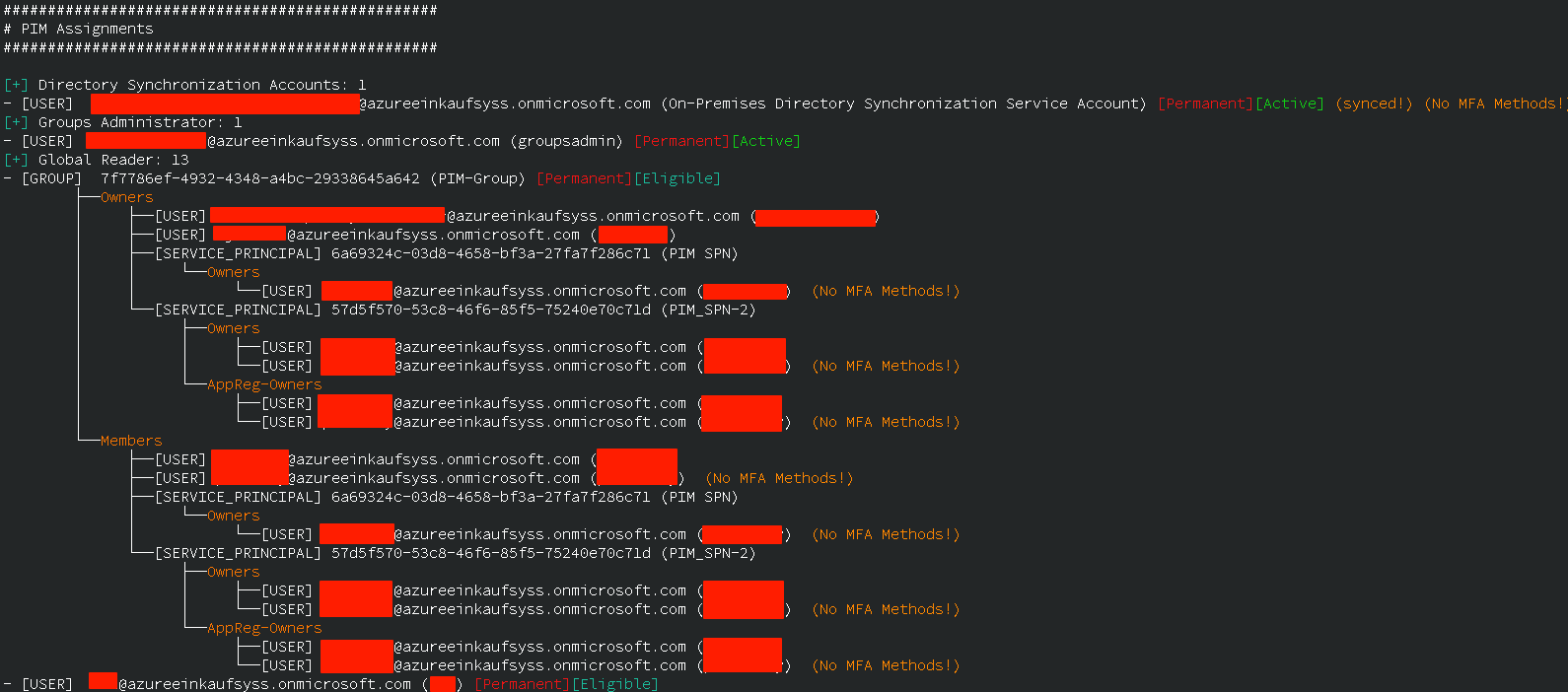
While enumerating role assignments, further quality of life information like account status (if the administrator is actually disabled), as well as scoping information (if the assignment is only scoped for an administrative unit) is provided.
Wrapping up
The new version of AzurEnum not only increases coverage of gathered information on configurations and role assignments, but also improves the usability of the tool. The new authentication flows adapt to state-of-the-art conditional access policies, to reduce the number of exceptions needed to use the tool for a already hardened environment.
An overview on the ideal usage of the new version is given in the GitHub repository, make sure to head over and check it out!